Blog

  • terraform-gcp-graphdb

    GraphDB deployment package on GCP

    This terraform module allows you to deploy GraphDB instance in Google Compute Engine.

    Table of contents

    About GraphDB

    GraphDB logo

    Ontotext GraphDB is a highly efficient, scalable and robust graph database with RDF and SPARQL support. With excellent
    enterprise features,
    integration with external search applications, compatibility with industry standards, and both community and commercial
    support, GraphDB is the
    preferred database choice of both small independent developers and big enterprises.

    Features

    The module provides the building blocks of configuring, deploying and provisioning a single VM of GraphDB
    using Google Compute Engine. Key features of the module include:

    • Google Cloud Compute Engine Instance

    Versioning

    The Terraform module follows the Semantic Versioning 2.0.0 rules and has a release lifecycle separate from the GraphDB
    versions. The next table shows the version compatability between GraphDB, and the Terraform module.

    GraphDB Terraform GraphDB
    Version 0.1.x Version 10.7.x
    Version 0.2.x Version 10.8.x
    Version 0.3.x Version 11.0.x
    Version 0.4.x Version 11.1.x
    You can track the particular version updates of GraphDB in the changelog.

    Prerequisites

    Before you begin using this Terraform module, ensure you meet the following prerequisites:

    • Google Cloud CLI:
      Google Cloud CLI

    • Terraform Installed: You should have Terraform installed on your local machine. You can download Terraform from
      the [https://developer.hashicorp.com/terraform/install?product_intent=terraform](Terraform website).

    • Google Cloud Credentials: Ensure that you have Google Cloud credentials configured on your machine. You can configure Google Cloud access
      keys and secret keys using the Google Cloud CLI.

    • Terraform Google Cloud Provider Configuration: Configure the Google Cloud provider in your Terraform project. You can add your Google Cloud
      access and secret keys as environment variables or use other methods for provider configuration.

    Inputs

    Name Description Type Default Required
    source_image Defines the VM image passed from the GCP Marketplace string "projects/graphdb-public/global/images/ontotext-graphdb-11-1-2-202510150839" no
    goog_cm_deployment_name Deployment name string "graphdb" no
    project_id Project in which the VM will be created string n/a yes
    zone The zone where the VM will be created string "us-central1-a" no
    machine_type Type of the VM that will be created string "n2-highmem-8" no
    boot_disk_size Boot disk size in GBs number 500 no
    boot_disk_type Type of the boot disk string "pd-ssd" no
    network_interface The network interface to attach the VM to string "default" no
    allowed_ingress_cidrs CIDR blocks that are allowed to access the GraphDB port list(string) [ "0.0.0.0/0" ] no

    Quickstart

    terraform init
    terraform apply

    Additionally, to specify custom values for the variables, you can use a .tfvars file, or specify individual
    variables on the command line, e.g. -var project_id=<test-project>.

    Metadata

    To update and validate the metadata.yaml and metadata.display.yaml you can use Google’s CFT
    tool https://pkg.go.dev/github.com/GoogleCloudPlatform/cloud-foundation-toolkit/cli/bpmetadata

    Run the following command in the project directory to regenerate the metadata:

    cft blueprint metadata -d -p .

    Or simply to validate:

    cft blueprint metadata -v -p .

    Resources

    Local Development

    Instead of using the module dependency, you can create a local variables file named terraform.tfvars and provide
    configuration overrides there.
    Here’s an example of a terraform.tfvars file:

    project_id = "example-project-id"
    
    zone = "us-central1-a"
    
    machine_type = "n2-highmem-8"
    
    boot_disk_size = "500"
    
    boot_disk_type = "pd-ssd"
    
    allowed_ingress_cidrs = ["0.0.0.0/0"]
    

    Release History

    All notable changes between version are tracked and documented at CHANGELOG.md.

    Contributing

    Check out the contributors guide CONTRIBUTING.md.

    License

    This code is released under the Apache 2.0 License. See LICENSE for more details.

    Visit original content creator repository

  • rexumee

    Rexumee

    License: Apache-2.0 Build Status

    A simple one page website for professional resume.

    Rexumee is using a minimalize Spring Boot stack with embedded web server, and a YAML file for the resume content. Just download (clone) the source code, build and test from local environment or build the Docker container for production deployment.

    Tech Stack and Library

    Edit Resume Content

    To edit resume content with your preferences, open the file: src/main/resources/application.yml , then edit under the resume sections. All the content structure are using YAML markup language convention. Check the customable fields from example or from the online demo.

    Build and Running the Application within Localhost

    Build

    mvnw clean package

    Running Application

    mvnw spring-boot:run

    Application will run on port 8080, access the URL http://localhost:8080 from web browser.

    Running Application (alternative)

    There is alternative for run the application. After build, go to target folder, make sure there is rexumee.jar file. Then, from that folder run:

    java -jar rexumee.jar

    Docker Deployment

    Make sure you have installed Docker & Docker Compose prior to deployment, if not:

    • Find out the documentation about Docker Installation at here.
    • How to install Docker-Compose here.

    From the project root folder, run:

    docker-compose up -d

    Check whether the deployment run properly:

    docker ps

    And you can access the webpage from port 80.

    Online Demo

    For online demo and preview, please visit here.

    Copyright and License

    Copyright 2018 Maikel Chandika (mkdika@gmail.com). Code released under the Apache License, Version 2.0. See LICENSE file.

    Visit original content creator repository
  • client-events

    Common Module for Event-driven Architecture

    Supports commands and events (CQRS).

    Overview

    This package serves as a shared library for all message interfaces, commands and events in the system. It ensures consistency and correctness while implementing the event data model across Applications, Microservices, Aggregators and various programming languages.

    How it works

    Client’s event data model is exported as command and event enums, and message interfaces, to enable easy lookup of the available identifiers in the system.

    import { Commands, Events } from "@devpie/client-events";
    
    console.log(Commands.EnableAccounting);
    // EnableAccounting
    
    console.log(Events.MembershipAdded);
    // MembershipAdded

    Existing interfaces allow us to type check the message body being sent, ensuring correctness of implementation.

    export interface MembershipAddedEvent {
      id: string;
      type: Events.MembershipAdded;
      metadata: Metadata;
      data: {
        MemberId: string;
        TeamId: string;
        UserId: string;
        Role: string;
        Created: string;
      };
    }

    Messaging

    Messaging systems allow Microservices to exchange messages without coupling them together. Some Microservices emit messages, while others listen to the messages they subscribe to.

    A message is a generic term for data that could be either a command or an event. Commands are messages that trigger something to happen (in the future). Events are messages that notify listeners about something that has happened (in the past). Publishers send commands or events without knowing the consumers that may be listening.

    Language Support

    This package is written in TypeScript but converted to language targets. Each supported language has its own package.

    Supported languages include:

    Development

    Modify src/events.ts, the source of truth, then re-build to update all packages.

    npm run build
    

    Release

    Here’s the steps to perform a manual release for Typescript and Go packages (needs to be automated). Publishing Go modules relies on git tags. https://blog.golang.org/publishing-go-modules

    # 1. npm run build
    # 2. update ./package.json version
    # 3. commit changes to git
    # 4. create a new tag for release
    git tag v0.0.1
    # 5. push new tag
    git push origin v0.0.1
    # 6. push changes to remote repository
    git push origin main
    # 7. publish npm module
    npm publish

    Visit original content creator repository

  • YasenBaka

    YasenBaka Build Status

    Yasen-Baka, a multifunctional Discord bot
    with special World of Warships commands., written with the discord.py api.
    You can invite the bot to your guild with this link

    Notice

    I no longer use discord for personal reasons. I will try to fix bugs as they come up but as of this momnet I do not plan on adding any new features.

    If you are interested in continuing this project please shoot me an email at mat1g3r at gmail dot com.

    Usage

    To get started with the bot, simply type ?help into your guild channel.

    Commands are divided into 9 categories, they are listed below.

    • Bot Info Commands:

      help, info, ping, prefix reset, prefix set, prefix
      
    • Fun Commands:

      choose, repeat, roll, salt
      
    • Moderation Commands:

      masspm, purge
      
    • Music Commands:

      play, playdefault, playing, playlist, setskip, skip, stop
      
    • Nsfw Commands:

      danbooru, e621, gelbooru, konachan, rule34, yandere
      
    • Osu Commands:

      osu
      
    • Utility Commands:

      avatar, currency, joined, latex, stackoverflow
      
    • Weeb Commands:

      LN, anime, ayaya, chensaw, joke, kanna, karen, manga, safebooru, umi
      
    • World of Warships Commands:

      clan, shame, shamelist add, shamelist remove, shamelist
      

    Self Host

    To self host yasen, you will need those packages installed on your system:

    In addition, you will need to execute the following command to install required libraries:

    First cd into the directory where yasen is located, then:

    pip install -Ur requirements.txt

    Make a copy of YasenBaka/data/sample_db in the YasenBaka/data/ directory and rename it to yasen_db

    Make a copy of YasenBaka/config/sample_config.json in the YasenBaka/config/ directory and rename it to config.json. Then you will need to fill out the required config values and api keys. I am not responsible for helping you obtaining any of the api keys.

    Finally to run, do:

    python3 yasen-baka.py

    Contributing

    For non-developers, you can contribute by reporting bugs or making suggestions.
    Simply open a Github issue here

    For developers, if you are interested in contributing, follow the steps below:

    1. Fork it ( https://github.com/MaT1g3R/YasenBaka/fork )
    2. Create your feature branch (git checkout -b my-new-feature)
    3. Commit your changes (git commit -am ‘Add some feature’)
    4. Push to the branch (git push origin my-new-feature)
    5. Create a new Pull Request

    Visit original content creator repository

  • community

    Keptn Community

    Chat On Slack GitHub Discussions Community Roadmap

    👋 Welcome to the Keptn community! This repository is used for community management related issue tracking, including but not limited to community programs, enhancement ideas, memberships and permissions. See also the community page on keptn.sh/community.

    References

    Roles and Groups

    Community resources

    There are also some resources stored in this repository or elsewhere:

    Community Meetings

    Name Meeting Time Meeting Notes Join Link
    Keptn Community – APAC/EMEA Every Other Wednesday at 10:00 AM CET Google Doc Zoom
    Keptn Community – US/EMEA Every Other Wednesday at 10:30 AM ET (9:30 AM CT / 4:30 PM CET) Google Doc Zoom
    Keptn New Contributors Meeting Every 2nd Monday per Month at 10:30 AM ET (4:30 PM CET) Google Doc Zoom

    All meetings are listed in the CNCF Keptn Community Chapter as well as the public Keptn Google Calendar

    Contributing

    Any contributions to the Keptn community are appreciated! See the Keptn Contributing Guidelines.

    Contributors

    Contributors

    Made with contrib.rocks.

    Visit original content creator repository
  • US-FlightDelayAnalysis

    US-FlightDelayAnalysis

    Analysis of delays of domestic flights from Us Airportsin 2008

    Summary

    We analyzed a data set of delayed flights from 2008 in the U.S. to determine the factors which contribute to delays. Among the factors inverstigated were individual airlines, total number of flights, time of day, month of year and airport. We were unable to perform further analysis on the reasons for delay because there were many missing values for the flight delay reason columns.

    Insights

    1. Count of All Flights vs. Delayed Flights: It is apparent from the graph of all flights vs delayed flights that there is a correlation between the two, as was expected. Surprisingly, the volatility in the delayed curve not present in the all-flights curve indicates that delayed flights is not a perfect function of the total number of flights. For example, the variance (or increases and decreases) in the delayed curve between weeks 10 and 20, 50 and 52 and to a lesser extent 36 and 40, is not reciprocated in the all-flights curve.

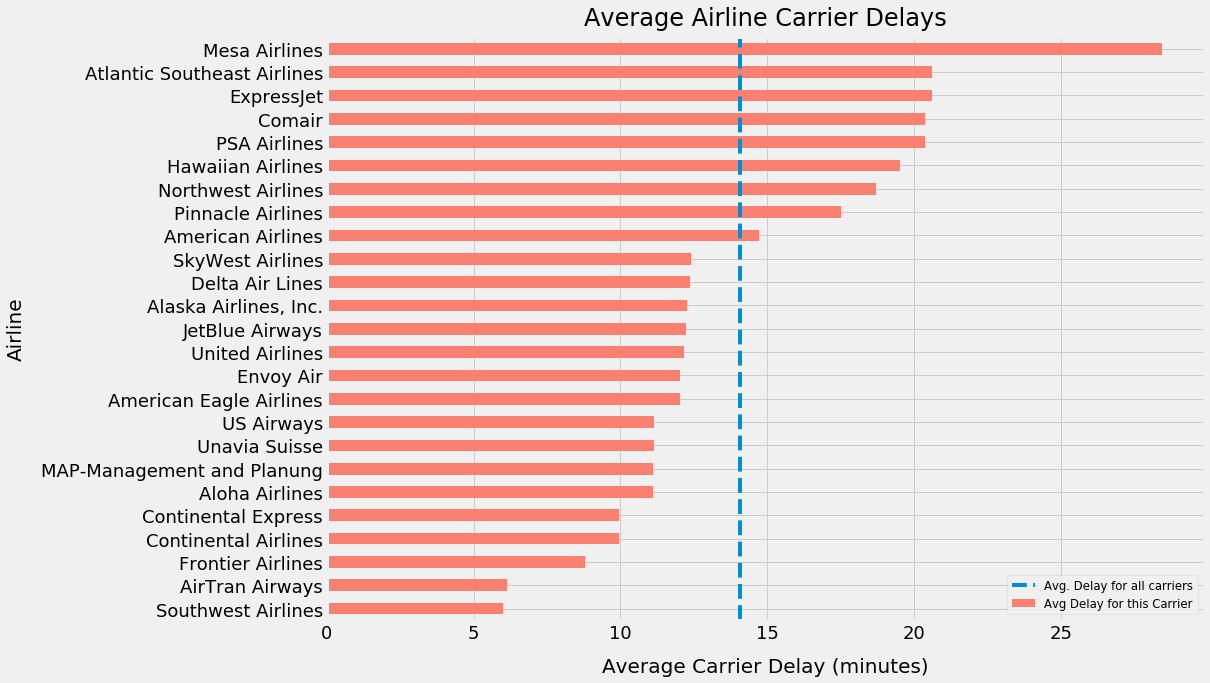
    2. Average Airline Delay Time: The major airline carriers, US Airways, United Airlines, and Southwest Airlines appear to have limited carrier-caused delay times on average. Conversely, all the carrier who shoulder the blame for the longest extended wait times are smaller airlines like Hawaii, Comair, and Atlantic Southeast. Lastly, Mesa Airlines is clearly the worst airline for those fliers who lack patience or loose schedules.

    1. Airline Percent Flights Delayed: Unlike the average carrier delay times, the major airlines have the highest percentag of flights delayed. Interestingly, contrary to their laid-back image, the airlines representing Hawaii boast the most punctual departures of any carrier.

    2. Percentage of Flights Delayed by Hour and Day: The heat map – Days Of Week + Time of Day, indicates that afternoons and evenings are relatively more delayed compared to mornings. Friday and Sunday evenings are at the peak of delays.

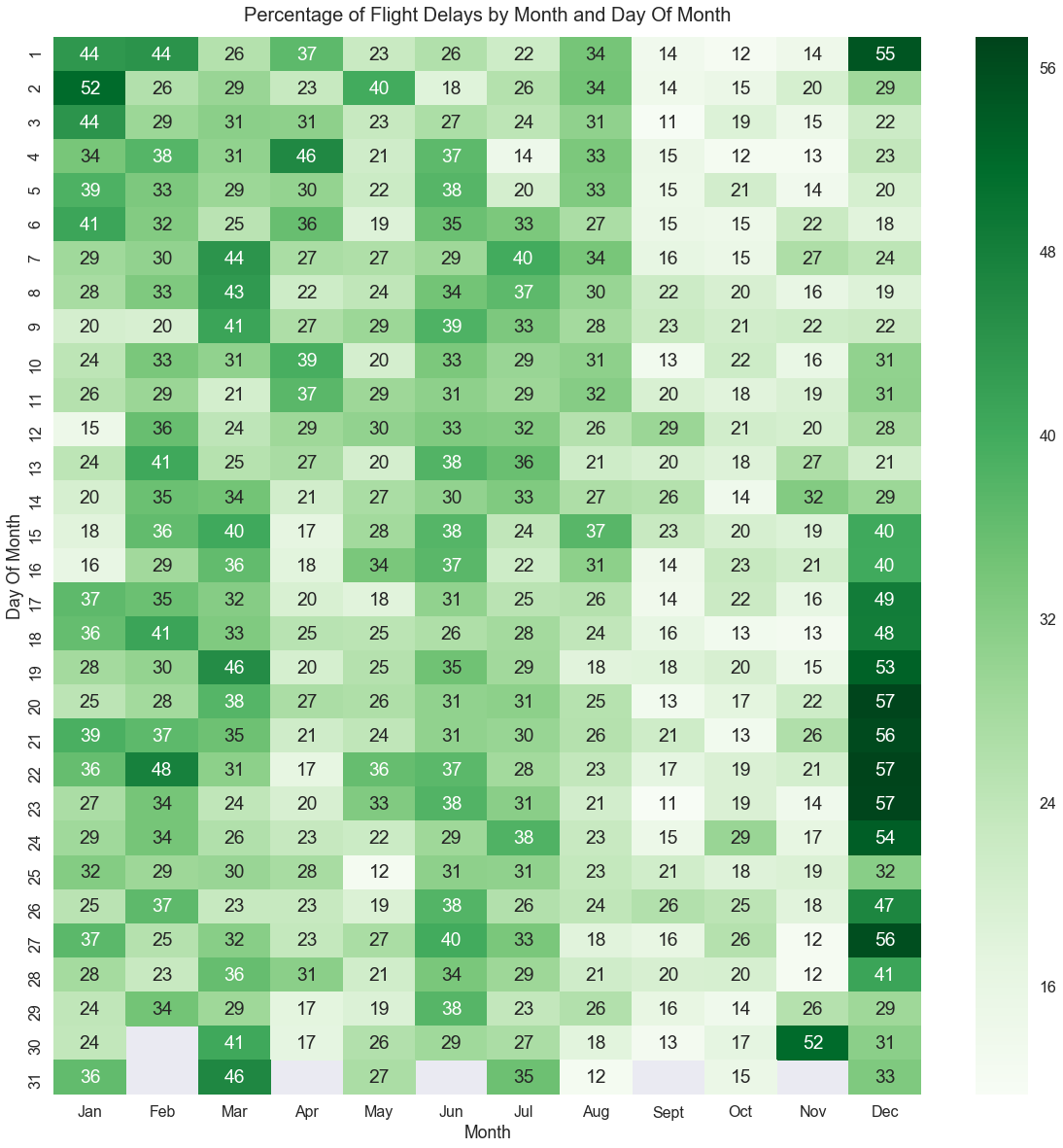
    1. Percentage of Flights Delayed by Month: Flight delays are maximum in around the holiday season. During Christmas and Thanksgiving, the delays could go up to 57%. We have some outliers in the middle of February and end of March, where there are no holidays or any reason that stands out.

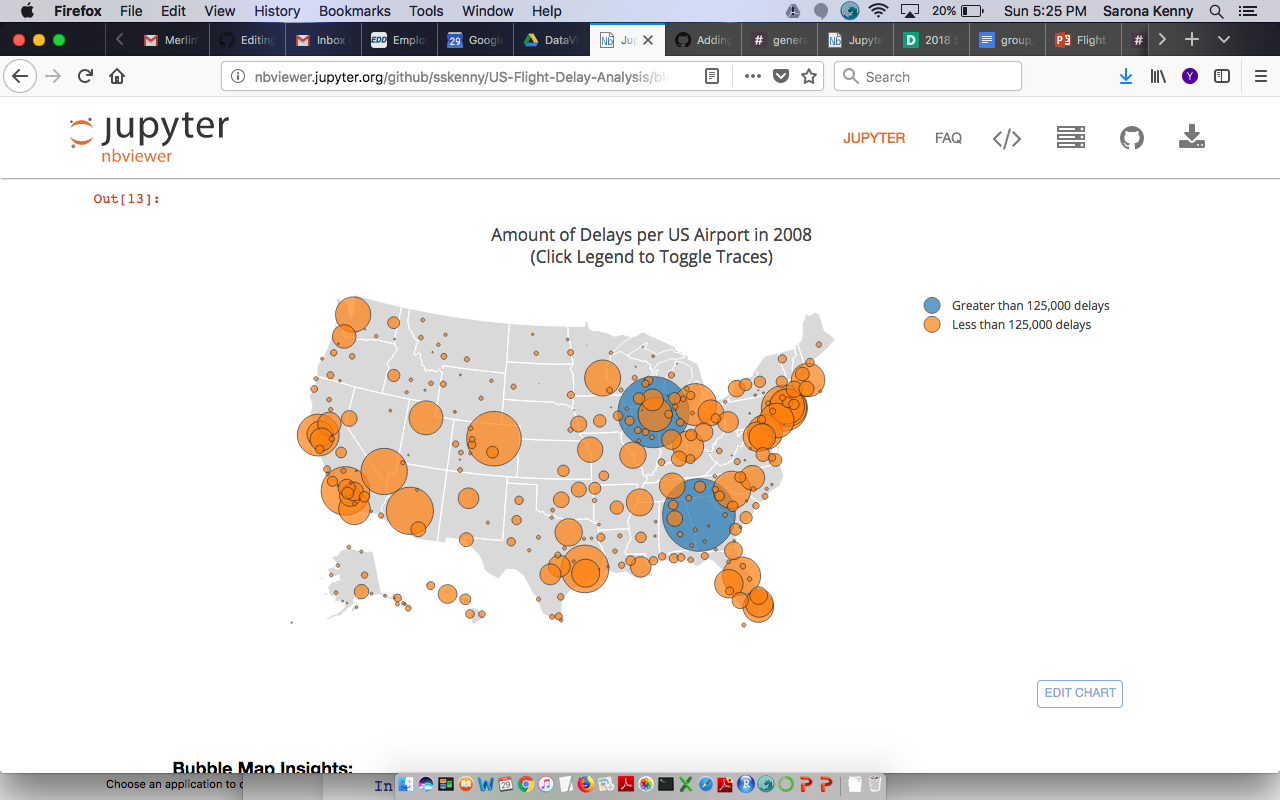
    1. Delays by Airport: The bubble map showed that the airports with most amount of delays are ATL in Atlanta and ORD in Chicago. ATL had 131,613 delays which constitutes 31.75% of all flights from ATL. ORD had 125,979 delays which constitutes 35.95% of all flights from ORD. Some airports with a lower amount of delays had a higher percentage of delayed flights. For example, AKN in King Salmon had 72 delays which constitutes 62.07% of all flights from AKN.

    Data sets

    Delayed US flights in 2008: https://www.kaggle.com/giovamata/airlinedelaycauses All US flights in 2008: https://www.kaggle.com/vikalpdongre/us-flights-data-2008#2008.csv Airport longitude and latitude location: https://raw.githubusercontent.com/jpatokal/openflights/master/data/airports.dat

    Tools And Libraries Used

    1. Jupyter Notebook
    2. Seaborn, Plotly, pyplot
    Visit original content creator repository